




In this article, I’ll explain how to implement vector search in SQL Server using the VECTOR_DISTANCE and VECTOR_SEARCH functions. You’ll learn how vector indexes work, when to use them, and what the key trade-offs are — including the current read-only table limitation. I’ll also cover the latest syntax changes in Azure SQL Database, where that limitation has already been lifted.
This is the third article in Greg Low’s series ‘AI text embeddings in SQL Server: everything you need to know’.
The VECTOR_DISTANCE function in SQL Server
Like how text embeddings are a representation of a location in a number space, any text that is similar in meaning to one another is located close together.
For example, I have a table of products with many columns but, for our purposes, the key ones are ProductID as an integer primary key, and a ProductName that’s a varchar(50) column. Here are the first 10 rows of the table:
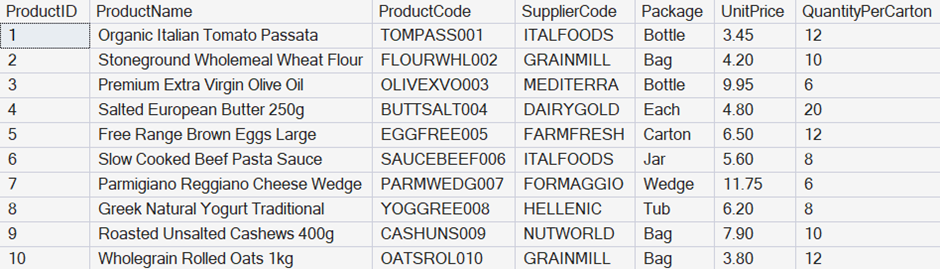
I’ll start by adding a column to hold the vector embeddings:
|
1 2 3 |
ALTER TABLE dbo.Products ADD ProductNameEmbeddings vector(384); GO |
Note that I’ve used a vector column with 384 dimensions. This is because I’m going to use the AllMiniLM external model that I created in the last article, and it has 384 dimensions.
Next, I’ll make sure that both Ollama and Caddy are running, and then I’ll populate this new column by calling the external model:
|
1 2 3 |
UPDATE dbo.Products SET ProductNameEmbeddings = AI_GENERATE_EMBEDDINGS(ProductName USE MODEL AllMiniLM); GO |
Once I have the embeddings in place, I can use the VECTOR_DISTANCE function to check similarity:
|
1 2 3 4 5 6 |
DECLARE @UserEmbeddings vector(384) = AI_GENERATE_EMBEDDINGS('Natural tomatoes from Italy' USE MODEL AllMiniLM); SELECT TOP(5) p.ProductID, p.ProductName FROM dbo.Products AS p ORDER BY VECTOR_DISTANCE('cosine', @UserEmbeddings, p.ProductNameEmbeddings); |
I started by taking a user prompt – Natural tomatoes from Italy – and calculated embeddings for it. I then used the VECTOR_DISTANCE() function to compare that value to the embeddings for every row in the table based on cosine distance.
Note that I could also have used a Euclidean or dot product based metric, but cosine is perfect for what I’m doing here.
The values returned on my system were:
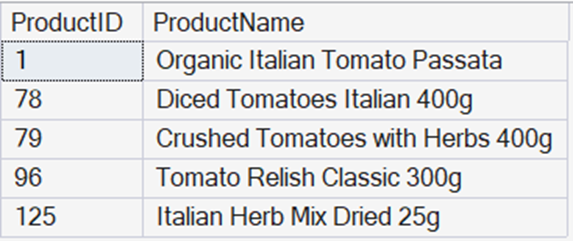
That’s a great response for this query, and note how hard it would have been to get anywhere near that with other functions such as LIKE().
Fast, reliable and consistent SQL Server development…
Vector indexes in SQL Server
While the query I had above is fine for a small number of rows, it would simply be far too compute-intensive with a large number of rows. There are two workarounds for this.
The first is to filter the rows some other way, like just using a standard WHERE clause. That should always be your first approach.
The second approach is to create a vector index, for example:
|
1 2 3 4 5 6 7 8 |
CREATE VECTOR INDEX VX_dbo_Products ON dbo.Products (ProductNameEmbeddings) WITH ( metric = 'cosine', type = 'diskann', maxdop = 4 ); GO |
Creating a vector index is similar to creating other SQL Server indexes, but with the advantage of having a few more options than the others. The main one is the metric.
Since the index is storing a result of a calculation, it needs to know – at creation time – which distance metric will be used. The type shown here is diskann (or disk approximate nearest neighbor). You can also specify the maxdop (maximum degrees of parallelism) for the index operation.
The name diskann should hint at something different here. Vector indexes are used to find approximate outcomes – they don’t guarantee precise outcomes. You must keep this in mind when using them.
Also note that, at the release of SQL Server 2025, vector indexing was shipped as a preview feature. Therefore, you need to enable preview features on the server to use them.
The VECTOR_SEARCH() function in SQL Server
It’s all very well to have this index structure, but how do we use it? The answer is the VECTOR_SEARCH() function. Here’s an example of it in use:
|
1 2 3 4 5 6 7 8 9 10 11 12 13 |
DECLARE @UserEmbeddings vector(384) = AI_GENERATE_EMBEDDINGS('Natural tomatoes from Italy' USE MODEL AllMiniLM); SELECT TOP(5) p.ProductID, p.ProductName FROM VECTOR_SEARCH ( TABLE = dbo.Products AS p, COLUMN = ProductNameEmbeddings, SIMILAR_TO = @UserEmbeddings, METRIC = 'cosine', TOP_N = 5 ) AS vs ORDER BY vs.distance; GO |
I’ve started with the same calculation of text embeddings for a user query about tomatoes. I’ve then asked for a TOP(5) from the vector search function. I tell it the table, column, metric, and TOP_N values, along with the value that I want to compare to.
On my system, this returns exactly the same output that the vector distance query did. However, the big difference here is in speed: this method would be drastically faster when dealing with a lot of data.
What’s the problem with the vector index in SQL Server?
One thing that might not have been immediately obvious is the effect that creating the vector index had on the table. Unfortunately, when a vector index is present, tables are read-only.
It’s not a huge issue if the data you are searching is relatively static, but for data that’s changing, it’s a problem. And it takes a lot of planning to work around. If you worked with the first version of columnstore indexes back in SQL Server 2012, you’ll understand how challenging this is.
The good news is that Microsoft was aware of how big an issue this would be and was already planning how to fix it. And you’re likely already seeing the changes if you’re using Azure SQL Database.
At first, the vector indexing in Azure SQL Database had the same limitations as the implementation in SQL Server. And if you have vector indexes that you created in Azure SQL Database earlier, they still apply.
Now, however, if you’re in a region where the new changes have already been rolled out, things are very different. There’s a new version of vector index. The syntax is the same, but executing it creates a new type of index. The brilliant part is that the read-only limitation on tables has been removed, too.
There’s just one catch
This is great news but there is one catch. When you have the new style of indexes, you need to use different syntax for vector search. Let’s compare the two.
The previous syntax is like what I showed you above:
|
1 2 3 4 5 6 7 8 9 10 11 |
SELECT TOP (10) p.ProductID, p.[Description] FROM VECTOR_SEARCH( TABLE = Sales.Products AS p, COLUMN = DescriptionVector, SIMILAR_TO = @Embeddings, METRIC = 'cosine', TOP_N = 10 ) AS vs ORDER BY vs.distance; |
And here’s the new syntax:
|
1 2 3 4 5 6 7 8 9 10 |
SELECT TOP (10) WITH APPROXIMATE p.ProductID, p.[Description] FROM VECTOR_SEARCH( TABLE = Sales.Products AS p, COLUMN = DescriptionVector, SIMILAR_TO = @Embeddings, METRIC = 'cosine' ) AS vs ORDER BY vs.distance; |
Previously, we had the TOP details inside the vector search and in the outer query. Now, it’s only in the outer query, but requires the keywords WITH APPROXIMATE.
Under the covers, there’s a good reason for this change. It’s mostly about where the filtering occurs: whether it’s during the vector search or only applied later. With the new syntax, it’s applied within the vector search operation – providing more consistent and faster results.
While we can’t use these new vector indexes in our on-premises SQL Server systems yet, I’m sure that a future release will provide similar options to those that now exist in Azure SQL Database.
Write accurate SQL faster in SSMS with SQL Prompt AI
FAQs: Vector search in SQL Server
1. What is the VECTOR_DISTANCE function in SQL Server?
VECTOR_DISTANCE compares text embeddings to find semantically similar rows, using distance metrics like cosine, Euclidean, or dot product.
2. When should I use a vector index in SQL Server?
Use a vector index when querying large tables — it makes vector search dramatically faster, though it currently ships as a preview feature in SQL Server 2025 and makes tables read-only.
3. What is the VECTOR_SEARCH function and how does it differ from VECTOR_DISTANCE?
VECTOR_SEARCH uses a vector index to return approximate nearest-neighbour results at scale, while VECTOR_DISTANCE scans every row — making VECTOR_SEARCH far faster on large datasets.
4. Why does adding a vector index make a SQL Server table read-only?
It’s a current limitation of the diskann index type in SQL Server 2025. Microsoft is aware of it — the restriction has already been lifted in updated Azure SQL Database regions.
5. What changed in the Azure SQL Database vector search syntax?
The new syntax moves TOP out of VECTOR_SEARCH and into the outer query with the WITH APPROXIMATE keyword, improving filtering performance and result consistency.
This document contains proprietary information and is protected by copyright law.
Copyright © 2026 Red Gate Software Limited. All rights reserved





Load comments